Installer
Fewer site visits. More recurring revenue.
With VisuShip you solve most problems right from your desk — and earn on every system you install, year after year.
Less work
You sit at your computer and look straight into your customer's system via VS-Cloud. Many problems get solved remotely — no drive to the boat required.
More money
Attractive partner terms — hardware- and cloud-based. We'll send you the details once you're registered.
Simple to install
A real-world example
A DC-DC converter charges the service battery from the starter battery while underway. In the marina, when the starter battery's charger is on, the same thing happens — unwanted.
Classic solution
An extra relay with ignition-sense or shore-power detection, plus the matching wiring.
With VisuShip
Map the same behavior purely in software via the Generator/Engine module — 2 clicks, no extra hardware.
A base set — NMEA2000, a few switch outputs, Victron connection — takes 4–8 hours to install. Experienced installers can do several systems in a single day, e.g. 3 boats of a charter fleet side by side.
But Victron Connect Is Free, Isn't It?
True — and for a pure Victron system, the app is a solid, free solution. The difference shows up as soon as more than one brand is on board, or the customer wants more than just readouts.
| Comparison | Victron Connect / VRM | VisuShip |
|---|---|---|
| Brands |
Victron only
|
Victron, Mastervolt, NMEA2000, WAGO, CZone — one interface
|
| Remote access |
Yes, but only for Victron/VE.Direct devices on the GX, and must be enabled separately (VRM two-way communication)
|
Yes, for every connected brand out of the box, no extra setup
|
| Operation |
Each device operated individually via its own submenu/screen
|
All devices controlled directly on the dashboard, no submenus
|
| Custom linking logic |
Only via Node-RED: requires a firmware switch, a beta feature, and writing your own automation
|
SPS module built into the regular interface, no coding – plus ready-made automation modules for the most common cases
|
| Alerting |
VRM sends email/push for alarms, but no Telegram/SMS; per user reports, alerts in the app itself can't be acknowledged or muted
|
Telegram, SMS, email — freely configurable
|
| Camera, AIS, weather |
No
|
Yes, built in
|
| For you as an installer |
No recurring business
|
Partner program, recurring revenue
|
What about Node-RED?
Node-RED on the Cerbo GX can technically do an enormous amount — arbitrary conditions, custom logic, integration with almost anything. But only if you switch the firmware, enable a beta feature, and build and permanently maintain the automation flows yourself. For the customer who just wants to know whether the generator is running, that's no solution.
Node-RED hands you the soldering iron and the schematic. VisuShip hands you the finished device.
Ready-Made Automation Modules for the Most Common Cases
SPS is the flexible all-rounder for special cases. For most standard automations, there's already a ready-made module – no custom linking rule needed.
Temperature Automation
Thermostat for heating/cooling relays, with hysteresis and run-on time.
Voltage Automation
Universal threshold switch, e.g. undervoltage protection or charger start.
Voltage On
Switches once a voltage is exceeded – e.g. turns the boiler on as soon as shore power is present.
Charger Automation
Automatic recharging at low state of charge, with no customer action needed.
Generator & Engine
Generator auto-start with retry logic, plus automatic DCDC charging while underway.
Timer
Time-of-day or sunrise/sunset scheduling, up to 12 channels.
On-Board Mode
Suppresses known onboard alarms, active again as usual once you leave the boat.
Linking (SPS)
The flexible toolkit for everything the modules above don't cover – no Node-RED needed.
Every onboard system, one connection
Whatever's already installed — VisuShip finds a way in. Connection paths for the most common systems at a glance.
| System | Connection path |
|---|---|
|
Victron GX / CerboGX
|
LAN → VisuShip router → VSC2 |
|
Victron VE.Direct
|
USB → VSC2 (or via Victron GX) |
|
Mastervolt
|
MasterBus → Modbus interface → RS485 → VSC2 |
|
Climma air conditioning
|
RS485 → VSC2 |
|
CZone
|
CAN bus (NMEA2000 profile) → VSC2 |
|
WAGO
|
LAN → VisuShip router → VSC2 |
|
Siemens LOGO!
|
LAN → VisuShip router → VSC2 |
|
Shelly
|
WiFi → VisuShip router → VSC2 |
|
Philippi
|
CAN bus (NMEA2000 profile) → VSC2 |
|
Aentron
|
CAN bus → VSC2 |
|
Super B
|
CAN bus (NMEA2000 profile) → VSC2 |
|
Fischer Panda
|
CAN bus → VSC2 (or via Victron GX) |
|
Whisper Power
|
WPC bus via CAN bus → VSC2 |
|
NMEA 2000
|
CAN bus → VSC2 |
VSC2 Controller
One controller. Every connection.
Each petal is a real connector on the VisuShip controller. Click to see what plugs in there.
One widget, whatever the brand mix
The VisuShip energy widget displays your system consistently — whether it's pure Victron, pure Mastervolt, a mix of both, or even more.
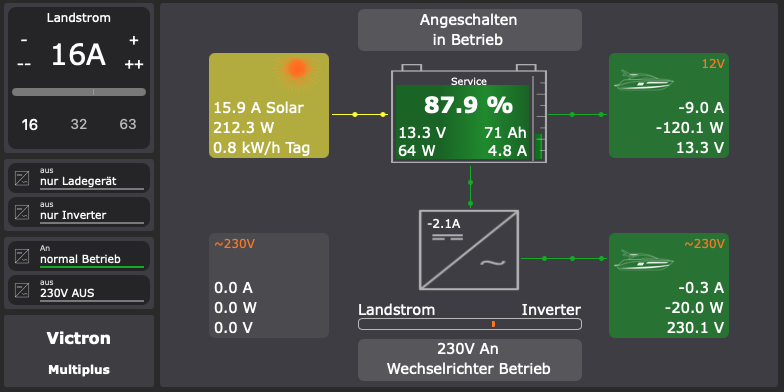 Victron only
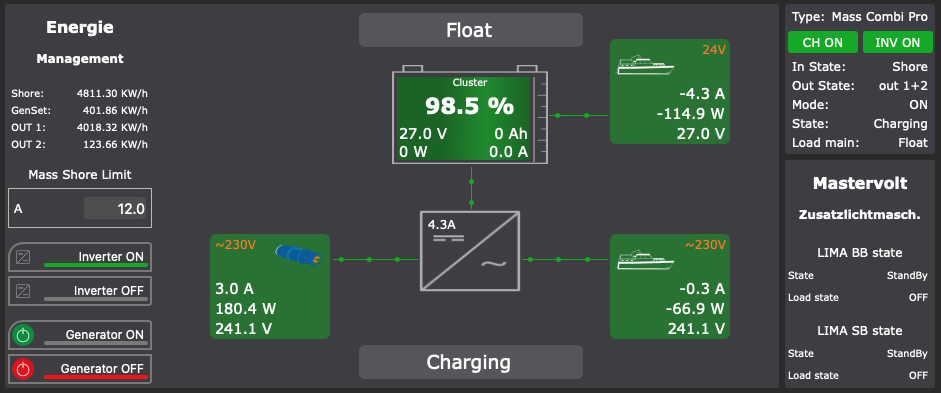 Mastervolt only
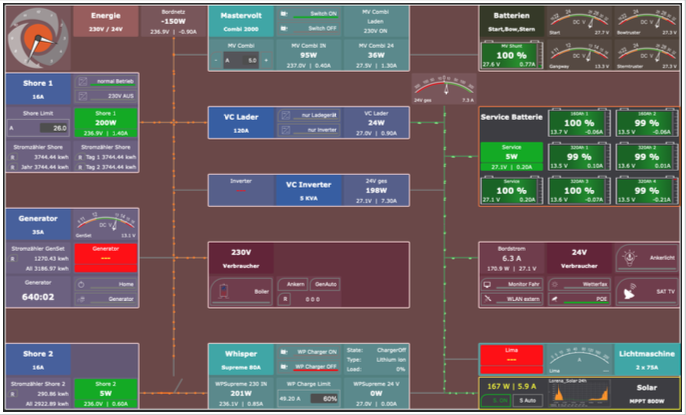 Victron, Mastervolt, Whisperpower, CZone
Access to installer documents
Fill in the form — we'll then set up your personal access.
Thank you!
Your request has been submitted. We'll get back to you shortly with your access details.
Something went wrong.
Please try again or email us directly at info@visuship.eu.